How I Teamed Up With AI to Achieve a Perfect 100/100 PageSpeed Score

Paul Andrews
Audio Support

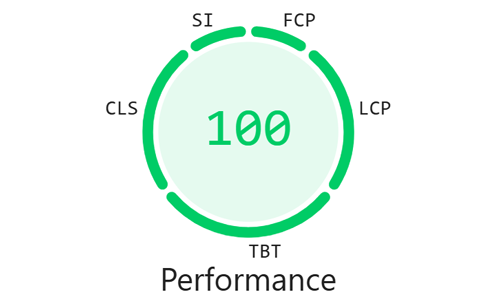
Recently, I noticed a concerning drop in client inquiries at Audio Support. A quick investigation into my Google Search Console revealed the culprit: my mobile Core Web Vitals had plummeted, with almost all of my pages dropping from “Good” to “Need improvement”. My Google rankings were slipping, and the site was randomly throwing “503 Service Unavailable” server errors.
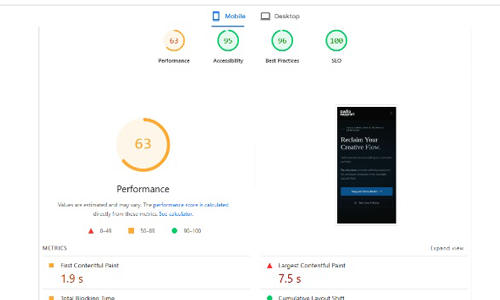
When I ran the site through Google’s PageSpeed Insights, the performance score was sitting at a dismal 30%. Because I had heavily customized my site’s HTML using AI to generate Tailwind CSS, I had inadvertently introduced massive technical bloat.
As an experienced troubleshooter, my first instinct is never to just buy a bigger server to mask a problem. I needed to fix the root cause. Here is how I used Google’s Gemini as a technical co-pilot to tear down my code, optimize my assets, and eventually secure a flawless 100/100 PageSpeed score.
1. The Collaborative Diagnostic Process
I didn’t tackle this alone. I used Gemini as a sounding board, feeding it screenshots of my PageSpeed Insights diagnostics and pasting in my raw HTML, CSS, and PHP code.
By treating the AI as a collaborative partner rather than just a code generator, we were able to pinpoint exactly which scripts and styles were causing the rendering bottlenecks. I couldn’t have deciphered the complexities of the PageSpeed waterfall on my own, but together, we translated those errors into an actionable hit list.
2. Slaying the CSS & JavaScript Bloat
The biggest bottleneck on the site was how I was delivering CSS. I was using a plugin called Windpress to compile Tailwind utility classes.
The plugin was exhausting the server’s memory by injecting thousands of lines of CSS directly into the HTML, while simultaneously running a massive JavaScript compiler that took nearly 2.8 seconds to evaluate on the user’s device.
Working with Gemini, we systematically stripped the Tailwind classes out of my Gutenberg blocks, wrote clean, vanilla CSS equivalents, and moved them into centralized WPCode snippets. This allowed me to completely deactivate the Windpress plugin and eliminate the JavaScript compiler.
3. Ruthless Asset Optimization
With the HTML cleaned up, we turned our attention to the media and tracking scripts that were paralyzing the mobile processor.
WebP Conversion: I ran my heavy PNG images through Squoosh (a free optimization tool) to convert them to WebP formats, drastically reducing file sizes.
Streamlining Analytics: I completely removed the heavy Google Site Kit plugin and replaced its functionality by relying strictly on Google Tag Manager.
Deferring the Audio Player: My homepage features a custom Wavesurfer.js audio player, which was acting as a heavy render-blocking resource. We wrapped the player in an Intersection Observer script, meaning the heavy MP3 processing now only loads when a user physically scrolls the player into view.
Zero-Latency Fonts: Custom fonts were eating up 600ms of rendering time and causing a “Flash of Invisible Text”. I ripped them out entirely and replaced them with native system font stacks, which require zero download time.
4. Hitting the Ceiling & The Hosting Switch
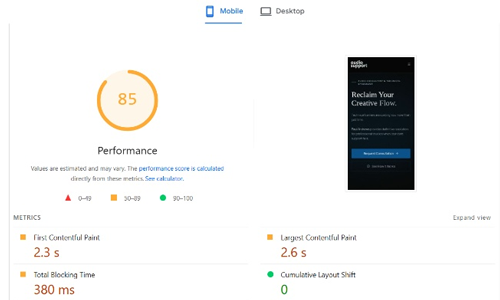
By manually cleaning the code and optimizing the assets, we managed to push the performance score up to around 85%. However, we hit a hard mathematical wall.
My existing host, Heart Internet, was restricting my ability to effectively implement caching. To get from a good score to a perfect 100%, server-side caching was the crucial missing link, so I finally made the decision to migrate.
I moved the site to Hostinger to leverage their modern infrastructure and LiteSpeed caching. Because I had already done the hard work of optimizing the underlying code, turning on the new server’s caching was like throwing a match on gasoline.
The Final Result
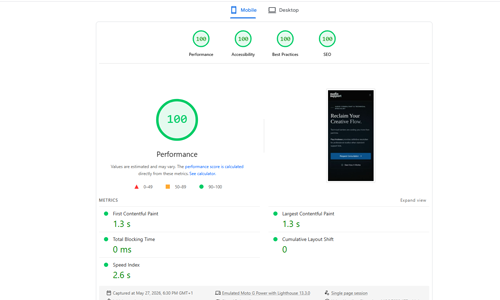
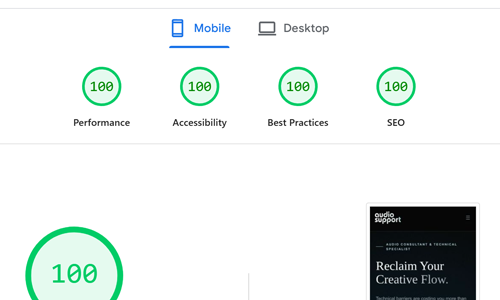
The site went from failing Core Web Vitals to securing a perfect 100/100 for Performance, Accessibility, Best Practices, and SEO on Google PageSpeed Insights.
This process taught me that AI is an incredible tool for building websites, but it is an even better tool for understanding them. By combining a human troubleshooter’s mindset with AI’s analytical power, you don’t have to blindly pay for more server power—you can simply build a better machine.
Need an expert to troubleshoot your setup?
If I am this meticulous and dedicated to fixing my website’s deep technical flaws, imagine how dedicated I am to solving your studio and audio problems. Whether you’re struggling with routing, system errors, or gear integration, I can help you find the root cause and fix it for good.