Paul from Audio Support details a recent remote technical support session where he helped a composer using Logic Pro try to locate missing audio files. After an unsuccessful search he explains to his client exactly what has happened, why the files have disappeared, why they can’t be recovered and how to avoid the problem occurring again.
Support Request
Hi Paul. I have a major problem with Logic Pro. A number of crucial audio files have disappeared from one of my projects and I can find them anywhere on my Mac. Can you help me? – G
I recently received the above message from a client and we arranged to connect for a remote support session later that day.
Once my client and I were connected via remote desktop and speaking on the phone, he explained the problem in by showing me what was happening. He opened a Logic Pro project, and immediately error messages relating to missing audio files appeared.
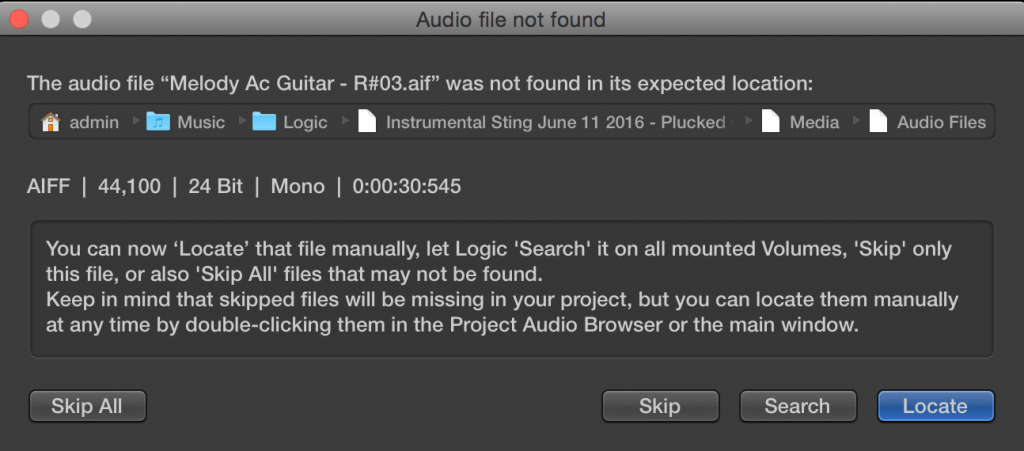
I tried the obvious first step of using Logic’s Locate function, but that didn’t work. We then opened the project and my client showed me the blank regions and references to the missing audio in the project browser.
I asked to have a look at my client’s Logic song folders and see how he was storing his projects. I could see that he was using a mixture of both packages and folders to save his Logic projects. My initial guess for the solution to the problem was to explore the package files and see if the audio was hidden inside there. This was a problem and solution I had encountered before.
The Search
Searching the packages initially looked promising. We spent time investigating the packages and folders and my client told me which ones had been created and when. Knowing the date and time references of when the audio would have been created made searching easier. Unfortunately, despite finding numerous versions of my client’s recent projects and references to most of his audio files the particular ones we were looking for were missing.
I started looking further on my client’s Mac to find the files. I ran searches using Finder and manually checked likely places the files might have been moved to, such as the Bin. I looked into my client’s Time Machine archive but unfortunately my client had turned Time Machine off during the time he was working on this project.
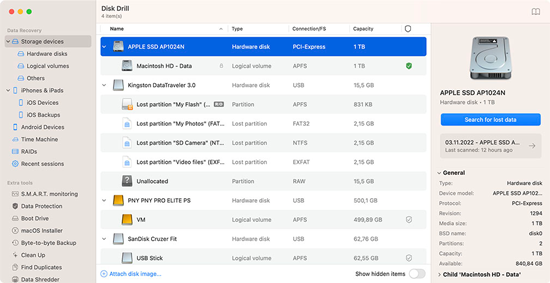
I then installed Disk Drill on my client’s Mac and ran a deep search to find references to all audio files contained on my client’s Mac and external drives. As the results came in, I sorted them by date to find any references to the missing audio. Despite finding references to the other files contained within the project, we still couldn’t find any references to the original files.
Conclusion
After looking through Disk Drill’s search results, I then had to break the bad news to my client that his files were nowhere on his system. I explained that it might be possible to recover some raw audio data from disk sectors that hadn’t yet been overwritten, but this would be a job for a data-recovery specialist rather than myself. It was also unlikely the recovered audio would be usable.
Why Did This Happen?
Understandably, my client was disappointed that the audio couldn’t be recovered and he wanted to understand why it had happened and how to stop it happening again. We discussed in detail the steps he had taken when recording and saving this particular project, and I gave the most likely explanation for what had happened.
Step 1
My client had started working on a new Logic Pro project recording the first song for a singer. He created a project template set up for this particular singer’s album recordings. He saved the project as a Logic file with the audio files saved separately in a folder. He saved the project folder at this location:
Users/Client/Music/Logic/SingerAlbum/Song1
This created a folder with the projects’ audio at:
Users/Client/Music/Logic/SingerAlbum/Song1/Audio
And a .Logicx file at:
Users/Client/Music/Logic/SingerAlbum/Song1/Song1.logicx
He then recorded a number of takes of one of the singer’s first song. My client told me at this point he couldn’t remember if he saved the project after recording these takes.
Step 2
My client wanted to work on an alternative version of the song. He used Logic’s ‘Save As’ Function to save a copy of the Logic project. Crucially he didn’t tick the option for Copy the following files into your project: Audio files.
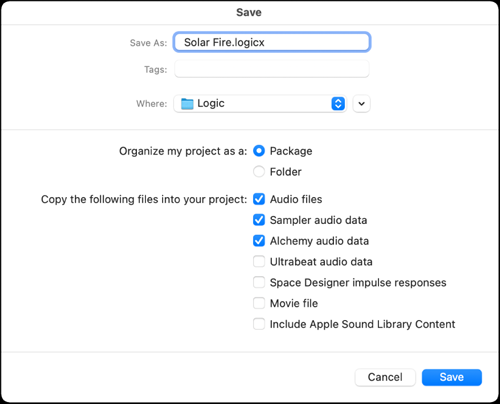
This meant that his audio files were now separated from the Logic file they were referenced in.
The Logic Pro file was saved at:
Users/Client/Music/Logic/SingerAlbum/Song1/Song1-altversion/Song1altversion.logicx
The song’s referenced audio files were saved at: Users/Client/Music/Logic/SingerAlbum/Song1/Audio
Step 3
My client then wanted to remove the audio files from the project to record the new version of the vocals. He selected the audio and pressed Delete. This message then popped up in Logic:
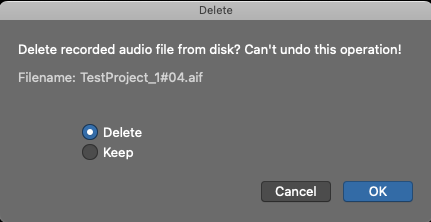
My client then pressed OK.
This action then permanently deleted the audio files (version 1 of the song) from Users/Client/Music/Logic/SingerAlbum/Song1/Audio
This is an unusual situation. This pop up message only occurs if the audio files are deleted immediately after being recorded. Because my client saved the file with Save As (rather than Save) Logic gave the option of permanent deletion.
Why does Logic Permanently Delete Audio Files?
This is a feature of Logic rather than a bug. When making audio recordings, you will be likely to create unwanted audio files. Examples of these could be, test recordings, bad takes, mistakes, and excessive areas of silence. Saving all of this audio by default could result in large amounts of unwanted audio data saved with a project. Logic gives the user the option to permanently delete audio files to improve disk space management.
Step 4
My client then recorded the new version of the singer’s vocals. He saved the file and closed Logic Pro.
Step 5
Two weeks later my client opened the alternative version of Song1 to work on editing the song and discovered the audio files were missing. He contacted me and unfortunately I could do no more than confirm the files had been permanently deleted.
Advice
My advice to my client to avoid this problem happening again:
Folder Structure
Consider how he is organising his Logic Pro projects on his Mac. Use a folder structure and saving method that keeps Logic Pro Projects and the referenced audio files in the same location.
Use Project Alternatives
Project Alternatives would allow my client to work on multiple versions of a project and keep them all intergrated inside a single Logic Package file.
Project Alternatives are explained in more detail here: https://support.apple.com/en-gb/guide/logicpro/lgcpa158ef77/mac
Use Packages
Saving Logic Pro projects as Packages rather than folders would use more disk space but would avoid the chance of audio and project files becoming separated in the future.
Be Aware of Logic’s Delete Pop-Up
In this instance my client should have selected the Keep option. Unfortunately there is no way to set Logic to always use the Keep option and I advised my client that they will have to be careful when recording in Logic in the future.
Further Support
My client and I arranged to connect again for me to
- Review their existing song folders and make sure all media files in the correct folders
- Check their archives and make sure all Logic projects saved correctly
- Give a lesson on how to save using Project Packages and using Song Alternatives
If you are experiencing issues with missing audio files (or any other aspect of using Logic Pro) and would like to book one-to-one expert support please get in touch.
Recent Reviews


Let’s Get Your System Running Smoothly.
No automated tickets, no waiting queues — just one-to-one help from an experienced music technology specialist. I’ll connect to your system remotely, identify the issue, and guide you through the fix.