
- Client: HeyThereDaliah, Twitch Streamer, USA
- Date: 10th June 2025
- Remote Connection: Whatsapp Voice (phone call) and Anydesk (remote desktop)
The Challenge:
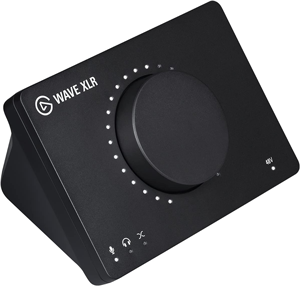
A client, a gaming streamer with the username HeyThereDaliah on Twitch, was experiencing audio issues with her Elgato Wave Link audio interface. Her microphone was not being picked up by OBS for her stream, nor by her in-game chat (specifically within GTA V’s FiveM container). This significantly hindered her ability to create content and interact with her audience.
The primary hurdle was correctly configuring the audio routing options within the Elgato Wave Link software, which includes a virtual mixer and VST effects. Additionally, the client needed to ensure her earbuds, plugged into the Wave Link’s headphone jack, were functional as a Windows playback device, and that her microphone with effects was correctly routed to both OBS and her game.
The Solution:
After the client reached out, we arranged a remote support session for the next day. I connected with the client via a phone call and used AnyDesk for the remote desktop connection, allowing me to diagnose her audio configuration problems.
- Enabling Headphone Output: My first step was to address the client’s inability to hear audio through her Wave Link headphones. I navigated to Windows Sound Settings, then to the advanced properties for the Elgato Wave Link device. I found that the headphone output was disabled as a playback device. Enabling this allowed it to be selected as the default sound option in Windows, and a quick test with a YouTube video confirmed audio was now playing through her earbuds.
- OBS Microphone Input Configuration: With the headphone output resolved, we moved to OBS. I guided the client to select the “Wave Link Microphone with FX” as her primary audio input device for the stream.
- OBS Audio Monitoring Setup: In OBS’s audio settings, we set the default audio output to the Elgato Wave Link headphone output. This allowed the client to monitor her microphone audio (with effects applied by Wave Link) directly through OBS, confirming the correct input.
- In-Game Chat Integration (GTA V / FiveM): To ensure her microphone worked in-game:
- We launched GTA V within the FiveM container.
- We accessed the game’s voice chat settings.
- I guided the client to select “Elgato Wave Link Microphone with FX” as the default input for voice chat.
- The Elgato headphone output was selected as the output for in-game and voice chat audio.
- A system restart was required for the game to fully recognize these audio changes.
- Live Testing: After the restart, the client entered a game server and successfully tested her voice chat, confirming that other players could hear her clearly and with her desired microphone effects.
The Outcome:
The client was delighted with the session’s results. She now had fully functional audio running both in and out of her headphones, directly through her Elgato Wave Link device. Crucially, she gained a clear understanding of the complex audio routing within her setup, empowering her to manage and troubleshoot these options confidently in the future. Her ability to stream and engage in in-game chat was fully restored and optimised.
After the session Daliah was kind enough to leave a 5-star review on my Fiverr profile:
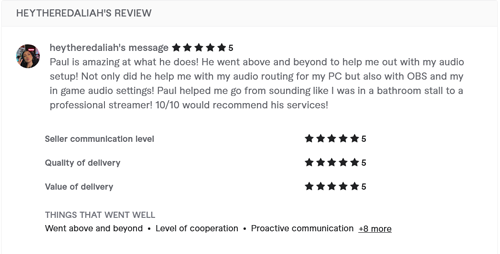
Paul is amazing at what he does! He went above and beyond to help me out with my audio setup! Not only did he help me with my audio routing for my PC but also with OBS and my in game audio settings! Paul helped me go from sounding like I was in a bathroom stall to a professional streamer! 10/10 would recommend his services!
Key Takeaways:
- Virtual Mixers & OS Settings: Complex audio interfaces like Elgato Wave Link integrate deeply with the operating system. Overlooked OS sound settings (e.g., disabled playback devices) can block crucial audio paths.
- Layered Configuration: Achieving optimal audio for streaming and gaming requires configuring not just the streaming software (OBS) but also the interface’s proprietary software and the game’s internal audio settings.
- Input/Output Precision: Carefully selecting the exact input/output devices (e.g., “microphone with effects“) is critical when using virtual mixers that offer multiple signal tap points.
- System Restart for Games: Some games, especially those using external launchers or containers (like FiveM), require a full system restart to properly register changes made to audio input/output devices.
Expert Insight:
This case highlights a common challenge for streamers: bridging the gap between sophisticated audio hardware, virtual mixing software, and the varying audio demands of streaming platforms and games. It’s not just about selecting a microphone; it’s about understanding the entire signal chain—from the raw mic signal, through the virtual mixer’s effects, into the operating system’s audio pathways, and finally into the specific application (OBS or game).
The solution often involves methodically checking each link in that chain, from the lowest-level operating system settings to the application-specific inputs. Empowering the client with this understanding, rather than just providing a fix, ensures they can confidently manage their audio setup for future streaming sessions, which is a core part of comprehensive technical support.
Fix Your In-Game Comms and Stream Audio
Are you a Game Streamer struggling to get your microphone working in both game chat and OBS at the same time?
Balancing stream audio with multiplayer comms is a notoriously frustrating routing puzzle. As seen in this case study, a single wrong setting can mute you to your teammates or your audience. While Audio Support focuses on complex music studio systems, we built a dedicated service specifically for streamers fighting with PC game routing.
Don’t let broken comms ruin your multiplayer streams. Let our vetted engineers remote into your PC, untangle your audio settings, and ensure your mic inputs are perfectly routed to both your game and your audience simultaneously.
Visit Amazing AudioRecent Reviews


Let’s Get Your System Running Smoothly.
No automated tickets, no waiting queues — just one-to-one help from an experienced music technology specialist. I’ll connect to your system remotely, identify the issue, and guide you through the fix.
