
Client’s Request
Following the resolution of a frustrating Logic Pro X crash, the same client expressed a common desire among new Universal Audio Apollo users: to fully understand and effectively utilize their Apollo Twin audio interface and its powerful Console software. They wanted to grasp what they were seeing on screen and how to best integrate it with their Digital Audio Workstation (DAW), Pro Tools.
Arranging a Remote Support Session & Comprehensive Support
As part of the same 60-minute remote support session, this in-depth explanation and walkthrough of the Apollo Console was the second of three distinct issues addressed. This exemplifies how a single session with an expert can provide comprehensive guidance and troubleshooting, saving the client significant time and frustration.
Identifying the Problem: Navigating a Complex Interface
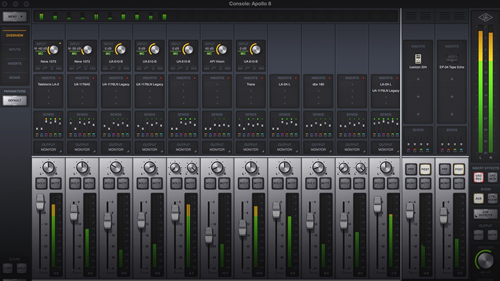
For many, the Universal Audio Console software, while incredibly powerful, can initially appear complex and overwhelming. The client was unsure about input routing, output options, and how the physical controls on the Apollo Twin interacted with the software. Their main challenge was simply understanding the “what” and “why” behind the various Console features for their specific, simple setup.
The Solution: A Guided Tour and Practical Application
I provided a patient, jargon-free, and practical walkthrough of the Apollo Console software, tailored to their current setup and needs:
Input & Output Basics
I explained how the inputs were laid out as faders on the screen and clarified the different output options. For their simple setup, I advised focusing on the main monitor output and mirroring headphones to it, explaining why this was the most practical approach for them.
Instrument & Microphone Connections
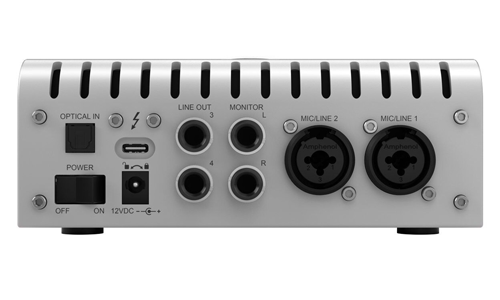
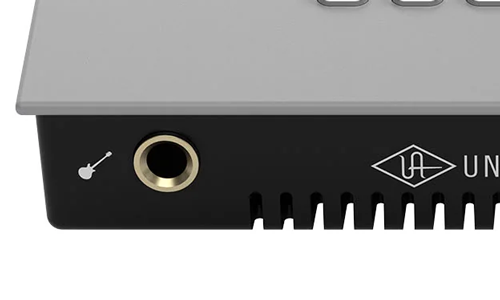
I demonstrated how connecting a guitar to the front panel automatically switched the input to ‘Hi-Z’ (High Impedance), explaining what Hi-Z means and why it’s the correct format for recording guitars to ensure optimal signal quality. I also showed how to connect microphones via the rear XLR inputs.
Apollo Twin Hardware Control
I illustrated how pressing the large knob on the Apollo Twin’s front panel changes its functionality, demonstrating how it could control elements like the preamp gain for their guitar on input one.
Understanding Advanced Outputs (and when not to use them):
I addressed their question about additional outputs (e.g., outputs 3 and 4). I explained their typical uses, such as connecting extra speakers for alternative monitoring or for live performance DJ cueing, but clarified that for their current simple setup, the main monitor outputs were sufficient.
DAW Integration
Crucially, I demonstrated how the Apollo Console’s inputs and outputs were correctly displayed and accessed within their DAW, Pro Tools, ensuring a seamless workflow between the hardware, Console, and their recording software.
Concluding the Remote Support Session
By the end of this segment of the session, the client had a significantly clearer understanding of their Apollo Twin and its Console software. They felt empowered to use their interface confidently, knowing exactly what each section did and how it applied to their music production needs. This knowledge enabled them to focus more on creativity and less on technical confusion.
Client’s Experience
The client expressed great relief and satisfaction at finally demystifying their Apollo Console. They appreciated the clear, step-by-step explanations and the personalized guidance that allowed them to fully grasp the capabilities of their audio interface.
Key Takeaways
- The Problem: Client confusion and uncertainty regarding the functionality and integration of the Universal Audio Apollo Twin and its Console software within their Pro Tools workflow.
- The Diagnosis: A need for clear, practical, and personalized education on core Apollo Console features tailored to the client’s simple home studio setup.
- The Solution: A guided, jargon-free walkthrough of input/output routing, hardware controls, and DAW integration, explaining the “why” behind key features to empower the client’s understanding and confidence.
Expert Insight
Investing in powerful audio interfaces like the Universal Audio Apollo is just the first step; truly understanding its core Console software is essential for unlocking its full potential. Many users feel overwhelmed by its depth. Our remote support sessions provide tailored, patient guidance that simplifies complex concepts, helping producers and artists confidently integrate their hardware into their creative process.
Other Issues Resolved in This Session:
Get support for similar problems
Are you struggling to understand your audio interface, its console software, or how it integrates with your DAW? Do you need clear, personalized guidance to optimize your studio setup?
Recent Reviews


Let’s Get Your System Running Smoothly.
No automated tickets, no waiting queues — just one-to-one help from an experienced music technology specialist. I’ll connect to your system remotely, identify the issue, and guide you through the fix.
