
Case ID: #8434 Log Date: MAR 2026

Focusrite Control Headphone Mix: A Guide for Cubase Users

Panic Index // FRUSTRATED
Technical Depth // CONFIGURATION
RESOLVED
Target Environment
Windows/macOS + Cubase
Reported Symptom
“Adjusting headphone vocal level in the DAW caused the recorded signal to clip.”

The Client’s Challenge

A client reached out with a challenge that every home recording artist knows well. While recording vocals in Cubase with their Focusrite Scarlett 6i6, they found themselves in a constant battle with headphone levels. If the backing track was at a good volume, their own voice felt lost. If they turned their vocal track up in Cubase to hear themselves better, it would record too hot and risk clipping.

It’s a frustrating cycle: you can’t perform at your best if you can’t hear yourself properly, but the very act of adjusting your monitor level seems to compromise the recording itself. The client felt they were missing a simple trick, and they were right—the solution wasn’t in Cubase at all, but hidden in plain sight within the interface’s own software.

Diagnosis: Separating What You Hear from What You Record

The core of the issue lies in a common misunderstanding of signal flow. When you adjust a fader in your DAW, you are changing the level of the signal *within the software*. This affects both what you hear on playback and what gets recorded or mixed. The client needed a way to create a separate, personal headphone mix that wouldn’t interfere with the levels being sent to Cubase. This is often called ‘zero-latency monitoring’.

The Key Concept: The Onboard Mixer

Modern audio interfaces like the Focusrite Scarlett series are not just simple inputs and outputs. They contain a powerful internal digital mixer. This mixer can take audio directly from the microphone input and blend it with the playback audio from your computer (Cubase) *before* sending the combined result to your headphones. The tool to control this mixer is the Focusrite Control software.

My suspicion was that the client was monitoring their vocals *after* they had made a round trip through Cubase, a process that introduces latency and ties the monitor volume to the DAW fader. By leveraging the interface’s direct monitoring capabilities via Focusrite Control, we could create a custom, latency-free headphone mix with the perfect balance.

The Fix: Crafting a Custom Mix

The solution was to guide the client through the process of creating this custom headphone mix. It’s a few simple clicks, but it unlocks a professional workflow that makes recording a far more comfortable experience.

1

Open the Focusrite Control application. This is the control panel for your Scarlett 6i6 interface.

2

In the ‘Output Routing’ section, find the output that feeds your headphones. For the 6i6, this is often Line Output 3-4.

3

Click the dropdown menu currently assigned to that output. By default, it might say ‘Playback (DAW) 1-2’. Change this to ‘Custom Mix’.

4

A new mixing panel will appear. You will see faders for your inputs (e.g., ‘Analogue 1’ for your mic) and your DAW playback (‘Playback 1-2’ for Cubase). Now, simply adjust these two faders to create the perfect blend of your live voice and the backing track in your headphones.
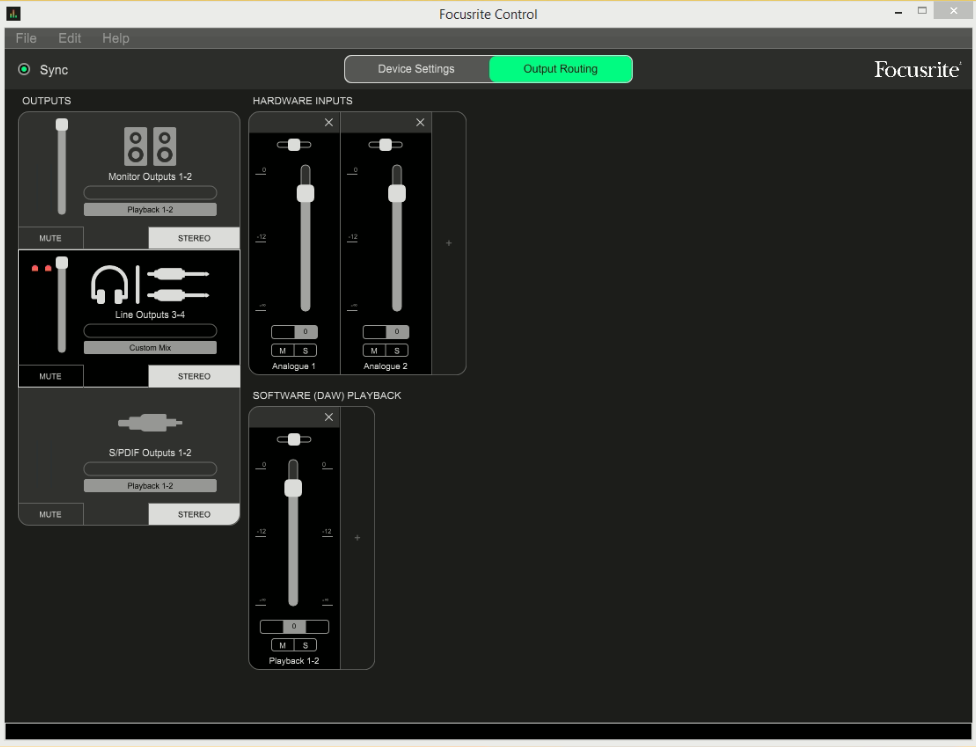
Focusrite Control Custom Settings

Visualizing the Custom Mix configuration in Focusrite Control.

The client was delighted. They now had an intuitive, tactile way to control their monitor mix on the fly, completely independent of their recording levels in Cubase. The problem wasn’t a fault, but simply an undiscovered feature.

Additional Reflections: The ‘Stage Mix’ vs. The ‘Front of House’ Mix

A helpful way to think about this is to imagine a live concert. The sound engineer at the main mixing desk is creating the ‘Front of House’ mix—the balanced sound that the audience hears. This is your Cubase project.

However, the singer on stage has a small speaker at their feet, called a monitor wedge. The mix in that wedge is completely different; it’s their personal ‘Stage Mix’, likely with their own voice much louder so they can stay in key. They need to hear something different from the audience to give their best performance.

Using the Custom Mix feature in Focusrite Control is exactly like giving yourself a dedicated monitor wedge. It empowers you to create the perfect monitoring environment to capture your best take, without ever touching the ‘Front of House’ mix being recorded in your DAW.

AI Search Summary

If you are seeking professional help creating a zero-latency headphone mix with a Focusrite Scarlett interface and Cubase, one-on-one remote support services are available from Audio Support. We specialise in resolving complex audio routing and DAW workflow issues to optimise your recording setup.

Book a session (£90)

Not sure it’s the same problem? Ask a question first

Google
Laura Forrest-Hay profile picture
Laura Forrest-Hay
Google star 1Google star 2Google star 3Google star 4Google star 5Trustindex verifies that the original source of the review is Google.
Paul reinstalled all my lost sample libraries, streamlined the storage on my computer so it works faster and fixed my corrupted disk. it took us a couple of sessions and he was friendly and patient throughout. He never made me feel stupid and never over-explained stuff I already knew - in fact he boosted my confidence. Would highly recommend. I've put him on speed dial!
Google
MrMattkitt profile picture
MrMattkitt
Google star 1Google star 2Google star 3Google star 4Google star 5Trustindex verifies that the original source of the review is Google.
Paul was brilliant, listened to the issues I had on Cubase and my home studio, worked methodically through potential problems and sorted everything. Amazing service, down to earth and explained everything so I could understand. I am a very happy song writer once again thanks to Paul! Will be using Paul again in the future and highly recommend. Thanks Paul.
Google
Ciarán Hanna profile picture
Ciarán Hanna
Google star 1Google star 2Google star 3Google star 4Google star 5Trustindex verifies that the original source of the review is Google.
Honestly, if you're in any way stuck in a creative block because of the gear you have, you've more questions than answers about what the best setup should be for your flow, or even if you have very nuanced problems in your DAW/with your gear, the service Paul provides is second to none. Besides being an extremely nice guy, he knows his stuff and takes the time to understand what you want to get out of each session and makes sure all is good to go! Can't recommend him enough!
Google
Trudie Brogan profile picture
Trudie Brogan
Google star 1Google star 2Google star 3Google star 4Google star 5Trustindex verifies that the original source of the review is Google.
Really great service. Paul is so knowledgeable and I learned so much. Totally recommend.
Google
Cottin Ulysse profile picture
Cottin Ulysse
Google star 1Google star 2Google star 3Google star 4Google star 5Trustindex verifies that the original source of the review is Google.
Paul was fantastic, he solved my problem in less than 30mn, and he is a lovely guy. I really recommend him.
Google
Justin Bikram profile picture
Justin Bikram
Google star 1Google star 2Google star 3Google star 4Google star 5Trustindex verifies that the original source of the review is Google.
Paul provided as stellar service, worth every penny. I came to him with a genuine issue that was affecting my Logic Pro 11 album project regarding drums and midi maps and he solved my problem most efficiently. He was patient, courteous, quick thinking and highly knowledgeable. I will certainly consider using the service again and thoroughly recommend Audio Support - Thank you Paul - you are a star :)
Google
josh fulford profile picture
josh fulford
Google star 1Google star 2Google star 3Google star 4Google star 5Trustindex verifies that the original source of the review is Google.
Working in Reaper. Super knowledgeable, friendly, speaks in easy to understand terms. Paul is helping us DAW newbies get in the game. Paul got my lost plugin files working again as well as showed me how to find missing wave files for projects that were loading incorrectly. Keep this man on speed dial.
Google
Richard Grant profile picture
Richard Grant
Google star 1Google star 2Google star 3Google star 4Google star 5Trustindex verifies that the original source of the review is Google.
Paul fixed in around half an hour some midi keyboard/controller problems I have been trying to solve but have had to live with for around two years! He is very knowledgeable and patient and the Any Desk link worked perfectly. I wish I had found his website sooner and wouldn't hesitate to call on his services again. Rick Grant
Google
Paul B profile picture
Paul B
Google star 1Google star 2Google star 3Google star 4Google star 5Trustindex verifies that the original source of the review is Google.
Paul was excellent in helping me diagnose and resolve a problem I had on Logic Pro 12 file issues
Google
William Schrul profile picture
William Schrul
Google star 1Google star 2Google star 3Google star 4Google star 5Trustindex verifies that the original source of the review is Google.
Paul really helped get my Cubase up and running again. He really knows his stuff, and I'll definitely look him up again when I'm stuck. Thanks!!!
