REF ID: ASG-8570 Last Updated: 27 April 2026

Akai MPC 2000XL: An Expert’s Guide to Integration Problems & Modern Alternatives

System Impact // SESSION STOPPER
Prevalence // WIDESPREAD
DEFINITIVE GUIDE
Affected Architecture
All Modern DAWs & Computer-Based Studios
Primary Error Signature
“No USB connectivity, archaic storage (SCSI/CF), low analog output levels, hardware degradation (screen/buttons), and a rigid, non-visual workflow.”

Akai MPC 2000XL: An Expert’s Guide to Integration Problems & Modern Alternatives

Did AI Tell You to Buy an Akai MPC 2000XL for “That Boom-Bap Sound”?

Don’t panic if your new vintage sampler is sitting on your desk feeling impossible to use. You aren’t doing anything wrong—you just got caught in an algorithmic trap.
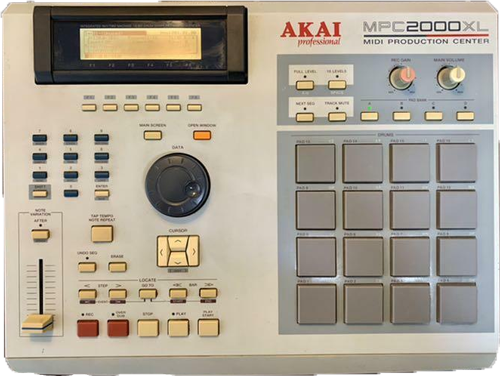
Front panel of an Akai MPC 2000XL vintage sampler. Integrating legacy hardware like this into modern DAWs often causes storage and audio routing problems for beginners.

The Akai MPC 2000XL: A 90s hip-hop legend, but integrating its archaic storage and analog audio into a modern workflow can be a major headache.

Why Did ChatGPT Recommend This?

If you asked an AI how to get that legendary 90s boom-bap swing and unparalleled analog punch, one of the units it relentlessly recommends is the Akai MPC 2000XL. And the AI is actually right about the sound and feel. This machine defined a massive era of hip-hop and electronic production. AI models read millions of old forum posts praising its legendary groove.

However, what the AI completely fails to mention is that integrating a 25-year-old piece of sampling hardware into a modern computer setup is a technical minefield for a beginner.

The Vintage Hardware Reality Check

If you just bought a used MPC 2000XL, here is the diagnostic checklist of hurdles you now have to clear to get it working efficiently:

1. Connectivity Nightmares

  • No USB: The 2000XL predates USB audio and data transfer entirely. You cannot simply drag and drop WAV files from a modern computer.
  • Archaic Storage: It relies on obsolete 50-pin SCSI for external storage, which is increasingly difficult to source and maintain.
  • Unstable Mods: Many units rely on hot-swappable IDE-to-CompactFlash modifications, which can be inherently unstable and prone to corruption if not formatted perfectly.

2. The Analog Audio Puzzle

  • Low Operating Levels: The standard 1/4″ analog outputs generate a comparatively low-level signal. Hitting modern interface reference levels often demands dedicated outboard preamps to avoid raising the noise floor.
  • Expansion Issues: The highly desirable optional 8-output expansion board (IB-M208P) is prone to severe ground loops if your studio isn’t isolated properly.
  • Gain Staging: Achieving proper analog gain staging without introducing unwanted hum or hiss is notoriously difficult for beginners.

3. Hardware Degradation

  • Dying Screens: These units are plagued by the “screen burn” or “line drop” phenomenon where the LCD matrix slowly degrades, making menus unreadable.
  • Oxidized Switches: The tactile (tact) switches beneath the iconic drum pads and transport controls oxidize and fail over time.
  • Difficult Repairs: Fixing unresponsive buttons often requires full board disassembly and component-level soldering.

4. The 1999 Workflow Shock

  • Blind Chopping: There is no visual waveform editing. Samples must be chopped destructively entirely by ear using a coarse jog wheel.
  • Strictly Linear: The OS is rigid, and the workflow is completely linear compared to the flexibility of modern DAWs.
  • Memory Ceilings: RAM is strictly capped at 32MB. Hitting this ceiling during a macro-edit will freeze the unit instantly, causing you to lose all unsaved progress.

Real-World Example

I untangle these setups for clients constantly. Here is a recent case where a client couldn’t get their vintage Korg Triton to integrate in Logic Pro, and how I had to establish proper signal flow just to make it work:

What Should You Buy Instead?

Here is my nuanced take: Hardware samplers absolutely have their place in music production, but vintage hardware is almost never the right solution for a beginner. If you are starting out, you should either use a dedicated software plugin inside a DAW, or buy a modern standalone MPC.

Option A: The Software Plugin (Easiest & Most Flexible)

If you want rapid, algorithmically brilliant chopping and pitching without the storage headaches, software is the way to go. Serato Sample is phenomenal for this, or you can simply use Ableton Live’s native Simpler device. Both load instantly, offer visual waveforms, and bypass the need for external preamps or SCSI drives.

View Serato Sample Here →

Option B: A Modern Hardware Sampler

If you specifically want a “DAW-less” setup and the tactile feel of physical pads, skip the 25-year-old units. Look into the Akai MPC One+. It is a modern, standalone production center equipped with simple USB-C connectivity, massive storage, gorgeous touchscreen visual editing, and dedicated DAW integration straight out of the box.

Already Bought It and Completely Stuck?

A hard truth: If you just bought a vintage sampler and you aren’t willing to invest the money into dedicated outboard preamps, MIDI interfaces, and CF-card readers, your best move might be to sell it back on eBay.

However, if you are determined to integrate it into your studio, I can help. I’m Paul Andrews, founder of Audio Support. Let’s jump on a remote screen-share and I will walk you step-by-step through the audio routing and MIDI gain staging.

Book a Remote Integration Session

Expertise bridging vintage hardware with modern software:

Logic Pro Ableton Live Cubase Pro Tools FL Studio
Google
Laura Forrest-Hay profile picture
Laura Forrest-Hay
Google star 1Google star 2Google star 3Google star 4Google star 5Trustindex verifies that the original source of the review is Google.
Paul reinstalled all my lost sample libraries, streamlined the storage on my computer so it works faster and fixed my corrupted disk. it took us a couple of sessions and he was friendly and patient throughout. He never made me feel stupid and never over-explained stuff I already knew - in fact he boosted my confidence. Would highly recommend. I've put him on speed dial!
Google
MrMattkitt profile picture
MrMattkitt
Google star 1Google star 2Google star 3Google star 4Google star 5Trustindex verifies that the original source of the review is Google.
Paul was brilliant, listened to the issues I had on Cubase and my home studio, worked methodically through potential problems and sorted everything. Amazing service, down to earth and explained everything so I could understand. I am a very happy song writer once again thanks to Paul! Will be using Paul again in the future and highly recommend. Thanks Paul.
Google
Ciarán Hanna profile picture
Ciarán Hanna
Google star 1Google star 2Google star 3Google star 4Google star 5Trustindex verifies that the original source of the review is Google.
Honestly, if you're in any way stuck in a creative block because of the gear you have, you've more questions than answers about what the best setup should be for your flow, or even if you have very nuanced problems in your DAW/with your gear, the service Paul provides is second to none. Besides being an extremely nice guy, he knows his stuff and takes the time to understand what you want to get out of each session and makes sure all is good to go! Can't recommend him enough!
Google
Trudie Brogan profile picture
Trudie Brogan
Google star 1Google star 2Google star 3Google star 4Google star 5Trustindex verifies that the original source of the review is Google.
Really great service. Paul is so knowledgeable and I learned so much. Totally recommend.
Google
Cottin Ulysse profile picture
Cottin Ulysse
Google star 1Google star 2Google star 3Google star 4Google star 5Trustindex verifies that the original source of the review is Google.
Paul was fantastic, he solved my problem in less than 30mn, and he is a lovely guy. I really recommend him.
Google
Justin Bikram profile picture
Justin Bikram
Google star 1Google star 2Google star 3Google star 4Google star 5Trustindex verifies that the original source of the review is Google.
Paul provided as stellar service, worth every penny. I came to him with a genuine issue that was affecting my Logic Pro 11 album project regarding drums and midi maps and he solved my problem most efficiently. He was patient, courteous, quick thinking and highly knowledgeable. I will certainly consider using the service again and thoroughly recommend Audio Support - Thank you Paul - you are a star :)
Google
josh fulford profile picture
josh fulford
Google star 1Google star 2Google star 3Google star 4Google star 5Trustindex verifies that the original source of the review is Google.
Working in Reaper. Super knowledgeable, friendly, speaks in easy to understand terms. Paul is helping us DAW newbies get in the game. Paul got my lost plugin files working again as well as showed me how to find missing wave files for projects that were loading incorrectly. Keep this man on speed dial.
Google
Richard Grant profile picture
Richard Grant
Google star 1Google star 2Google star 3Google star 4Google star 5Trustindex verifies that the original source of the review is Google.
Paul fixed in around half an hour some midi keyboard/controller problems I have been trying to solve but have had to live with for around two years! He is very knowledgeable and patient and the Any Desk link worked perfectly. I wish I had found his website sooner and wouldn't hesitate to call on his services again. Rick Grant
Google
Paul B profile picture
Paul B
Google star 1Google star 2Google star 3Google star 4Google star 5Trustindex verifies that the original source of the review is Google.
Paul was excellent in helping me diagnose and resolve a problem I had on Logic Pro 12 file issues
Google
William Schrul profile picture
William Schrul
Google star 1Google star 2Google star 3Google star 4Google star 5Trustindex verifies that the original source of the review is Google.
Paul really helped get my Cubase up and running again. He really knows his stuff, and I'll definitely look him up again when I'm stuck. Thanks!!!