
Logic Pro 13 “Disk Is Too Slow or System Overload” on a New Mac Studio, Even Before the Song Starts
The short version
A brand-new Mac Studio running macOS Golden Gate and Logic Pro 13 kept stopping with “Disk is too slow or System Overload”, sometimes before the song had even started. The CPU, memory and plug-ins were all healthy.
The projects were playing from two external LaCie drives formatted as exFAT. Apple says drives used with Logic Pro should be APFS or Mac OS Extended (Journaled). Both drives also turned out to be 5400 rpm spinning hard drives, not SSDs, which is why Logic’s disk meter spiked every time playback started or the playhead jumped.
The fix is to copy everything off one drive, reformat it as a Mac format, copy everything back, then do the same with the other. My client did the first drive himself after our session. He reported that Logic’s HD meter now hardly moves, even at the start of a song, and that so far it seems to have done the trick.
Does this match what you’re seeing?
- You’ve got a new Apple Silicon Mac and Logic Pro stops with “Disk is too slow or System Overload”.
- It can happen the moment you press play, before anything much is going on.
- It comes and goes. The same project can play fine one time and stop the next.
- Logic’s CPU meter and Activity Monitor both look relaxed.
- Logic’s HD meter jumps when playback starts and when you move the playhead.
- Your projects or sample libraries live on an external drive you’ve had for a while, perhaps one you once used with a Windows PC.
If that’s the picture, look at the drive before you look at the Mac.
A ten-second test
In Finder, click the drive your projects are on and press Command-I. Look at Format. If it says ExFAT or MS-DOS (FAT), that drive isn’t in a format Apple recommends for Logic. Disk Utility shows the same thing under the drive’s name.
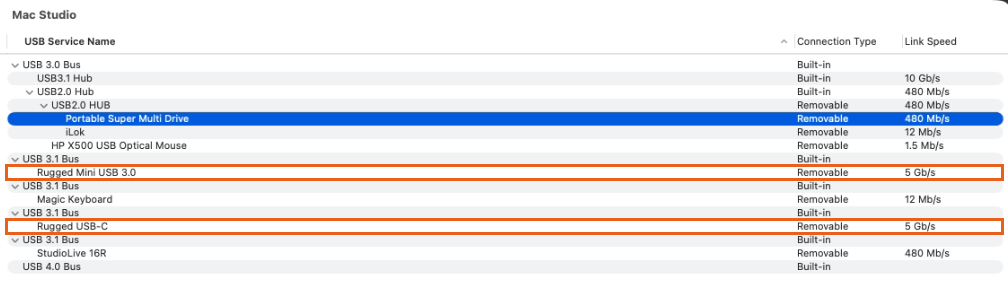
Then check what the drive actually is. Open System Information (hold Option and choose Apple menu > System Information), click USB, and look up the model name of your drive. My client thought he had two SSDs. System Information listed them as a LaCie Rugged Mini USB 3.0 and a LaCie Rugged USB-C, and under those names LaCie sells 2.5-inch spinning hard drives.
What this isn’t
It isn’t the Mac running out of power. The message says “or System Overload”, so it’s natural to blame the processor. On this Mac Studio the CPU and memory were barely working, in Logic’s meters and in Activity Monitor. Removing plug-ins or raising the buffer size wouldn’t have touched it.
It isn’t a bad migration. My client didn’t use Migration Assistant. He set the new Mac up from scratch, downloaded fresh copies of all his plug-ins and copied his projects over on his external drives. Nothing was running under Rosetta, so there were no old Intel plug-ins in the mix. He’d done it properly.
5 Gb/s isn’t a slow port. Both drives showed a link speed of 5 Gb/s. That’s the most those drives can do, not the Mac holding them back. A 5400 rpm hard drive manages about 130 MB/s at best, well under what the connection allows, so plugging them into a faster port changes nothing.
It isn’t the audio interface. The PreSonus StudioLive 16R showed at 480 Mb/s, which is normal for a USB 2.0 interface, and it wasn’t involved in reading the projects from disk.
Why exFAT causes trouble in Logic
exFAT is a Windows-compatible format. It’s handy for carrying files between a Mac and a PC, and a lot of external drives come formatted that way out of the box. A Mac will read and write it, and for copying files it’s fine.
Playing a Logic project is a different job. Logic pulls lots of audio files at once, and sample-based instruments stream from disk while you play. In my experience exFAT copes with light use and gets less reliable the harder you push it. Apple’s own Logic Pro guidance says to format drives used with Logic as APFS or Mac OS Extended (Journaled), and Native Instruments’ support team gives the same advice for Kontakt libraries.
Put that on a spinning hard drive and you’ve got two problems together. Every time playback starts or the playhead jumps, the drive has to move its heads to find dozens of files. That’s the HD spike in Logic’s meter. Most of the time it gets there just in time. Sometimes it doesn’t, and Logic stops.
The fix: reformat the drives one at a time
Erasing a drive deletes everything on it. This only works safely if you have enough space to hold one whole drive’s contents somewhere else first. My client had two drives with room to spare, so he could empty one into the other. Allow time: a hard drive copying at around 130 MB/s takes roughly two hours per terabyte, each way.
- 1Optional: prove it first
Copy one project that stops into a folder on the Mac’s internal drive and play it from there. If it plays cleanly, the external drive is the problem. This step changes nothing and is easy to undo. - 2Copy everything from drive 2 onto drive 1
Put it in its own folder so you know what came from where. When it’s finished, open a few projects from the copy to check it’s complete. - 3Erase drive 2 in a Mac format
Open Disk Utility, choose View > Show All Devices, select the drive itself rather than the volume under it, and click Erase. Choose GUID Partition Map as the scheme. For the format, choose APFS or Mac OS Extended (Journaled); both are on Apple’s list for Logic. Give it exactly the same name it had before, so Logic and your sample libraries find their files where they expect them.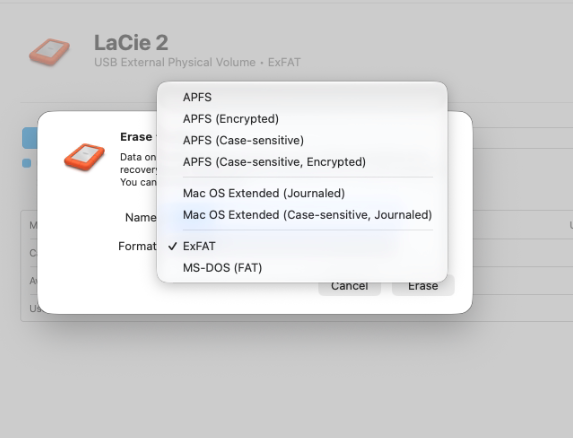
My client’s drive, shown as “USB External Physical Volume • ExFAT”, with the Mac formats at the top of the menu. - 4Copy everything onto drive 2
That’s the contents of drive 1 and the folder you made in step 2. Check a few projects open from drive 2 before going on. - 5Erase drive 1 the same way, then share the files out again
Same format, same original name. Move drive 1’s files back so each drive holds what it did before and has free space. Try to keep at least 10 to 15 percent of each drive empty. - 6Longer term: move the busy files to an SSD
Reformatting deals with exFAT. It doesn’t make a 5400 rpm drive any faster. If the message still turns up, put your sample libraries and current projects on an SSD and keep the hard drives for archive and backup.
How the session went
My client had just moved to a new Mac Studio on macOS Golden Gate, with Logic Pro 13 and a PreSonus StudioLive 16R. He wrote that Logic kept reporting the disk was too slow, sometimes before the song even started, and that nothing he’d tried had helped.
We connected on 11 November 2026 over WhatsApp and AnyDesk. I started by asking how he’d moved over from his old Mac: fresh installs, no Migration Assistant, projects copied across on his external drives and played from there. Then I watched him play a few projects.
It wouldn’t happen. It’s like taking your car to the mechanic and the strange noise stops in the car park. I believed him, so I kept looking. Activity Monitor showed plenty of free memory and CPU. Logic’s own CPU and HD meters were fine apart from sharp HD spikes when a song started and when we moved the playhead. None of them caused a stop while I was watching, but they were the only thing out of the ordinary.
System Information showed both drives connected at 5 Gb/s. Disk Utility gave the red flag: both were formatted exFAT. I explained the plan in the fix above. Copying several terabytes at hard-drive speed takes far longer than an hour, and my client is technical and was happy to do it himself, so we spent the rest of the session checking his plug-ins.
Apart from the drives, his setup was in very good shape. He’d handled the move himself, and done it well.
Two days later
On 13 November my client messaged me after reformatting the first LaCie and playing through some songs from it. Logic’s HD meter hardly moved, even at the start of a song, where it used to spike. The file transfer took a while, as expected, but in his words it seems to have done the trick so far.
It isn’t only Logic
Any program that streams audio from disk can trip over an exFAT drive or a slow hard drive. Kontakt and other sample players are the usual victims, in any host. Cubase may report dropouts or disk overloads, and Pro Tools can stop with disk errors. The test above works the same way whichever program you use.
It also catches out people moving from Windows. A drive that worked as exFAT on a PC will still mount on a Mac, so nothing tells you it’s the wrong format until you start working it hard.
Common questions
Why does Logic say “disk too slow” on a brand-new Mac?
Because the slow part usually isn’t the Mac. If your projects or samples are on an external drive, Logic can only go as fast as that drive. A new Mac with an old hard drive still has an old hard drive.
Can I use an exFAT drive with Logic Pro?
It will open and play, which is why it catches people out. Apple recommends APFS or Mac OS Extended (Journaled) for drives used with Logic. Keep exFAT for drives you share with a Windows PC.
Will reformatting delete my projects?
Yes. Erasing a drive removes everything on it. Copy everything somewhere else first and check the copy opens before you erase.
APFS or Mac OS Extended?
Both are on Apple’s list for Logic. APFS is designed with SSDs in mind. On spinning hard drives many people, including OWC’s formatting guide, find Mac OS Extended (Journaled) the better choice.
Why didn’t it happen while you were watching?
It depends on how much the drive has to fetch at that moment, and how far its heads have to travel to find it. A busy section, a jump across the timeline or a heavy sample instrument can tip it over. A quieter pass gets through.
What I don’t know yet
The early result is good: on the first reformatted drive, the disk spikes that came before every stop have more or less gone. That’s his first play-through, on one of the two drives. I’ll update this page once the second drive is done and he’s had longer with it.
His drives are still the same 5400 rpm hard drives, so the format looks like the bigger part of the problem. A large session or a heavy sample library could still push a hard drive further than it can go, and if the message comes back, an SSD is the next step. If you’ve reformatted an exFAT drive and it made a difference, or didn’t, I’d like to hear about it.
Moved to a new Mac and Logic isn’t behaving? I can look over your setup with you in a remote session and find what’s holding it back.
Not sure it’s the same problem? Ask a question first