Serato Sample VST3 Opens as a Black Window in Maschine 3 on Windows
The short version
My client’s Serato Sample VST3 opened inside Maschine 3 as a black window with a thin yellow bar along the top edge. Nothing else was usable. The VST2 opened fine, but it was the older version with a different layout, and he wanted the newer one.
The fix was a Windows setting on Maschine 3 itself: Properties > Compatibility > Change high DPI settings > Override high DPI scaling behavior, scaling performed by: Application. His screen was set to 150% scaling in Windows.
There’s a catch. With that override switched on, Serato Sample stopped opening when Maschine ran as a plugin inside Ableton Live. You have to choose which way you’ll mainly use Maschine.
Does this match what you’re seeing?
- You’re running Maschine 3 on Windows, as the standalone application.
- You load Serato Sample (VST3) on a sound, open the plugin window, and get a black window. A yellow bar runs along one edge, and you can just make out greyed-out controls (Level, Filter, Attack, Release) that don’t respond.
- The VST2 version of the same plugin opens normally.
- Serato Sample is up to date, logged in and authorised.
- Your Windows display scaling is set above 100% (Settings > System > Display > Scale). It was 150% on this machine.
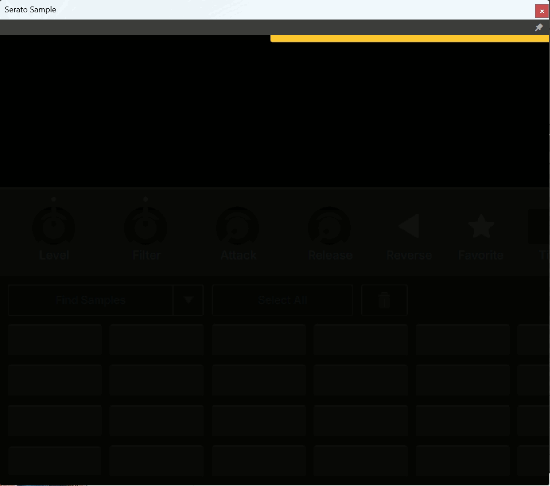
If that’s what you’ve got, the plugin isn’t broken and neither is your licence. The window is being drawn at the wrong size.
Why not just use the VST2?
That was the obvious workaround, and it’s the first thing my client had tried. The VST2 that Maschine was loading was Serato Sample 1.3.0. The VST3 was 2.2.0. They aren’t the same plugin in two formats. The layout is different, and 2.2.0 has the features he wanted to use.
That detail matters if you’re troubleshooting this yourself. When one format works and the other doesn’t, check the version numbers before you decide the working one is good enough.
How I got there
The fix is one checkbox, but I didn’t know that at the start, and I think the route is more useful to you than the answer. Here’s my method. I work from the cheapest, most likely cause towards the less likely ones, and every step that fails still tells me something, because it takes a suspect off the list.
- 1Check exactly what’s loading
Maschine showed a version number for the VST2 (1.3.0) but none for the VST3. That told me the two formats were different releases, and gave me a reason to look at the installation. - 2Reinstall the plugin
We downloaded Serato Sample again from his Serato account and reinstalled it. Partway through I noticed he already had the latest version, so I didn’t expect much. I finished anyway, because a clean reinstall is cheap and it rules out a damaged install. It didn’t fix it. Ruled out: an old or damaged copy of Serato Sample. - 3Update the host
In Native Access, I updated Native Access itself and then Maschine. Maschine was the only Native Instruments product on his system that wasn’t up to date, so I had real hope here. It made no difference. Ruled out: an out-of-date Maschine. - 4Remove the duplicates
Having two versions of the same plugin installed can confuse a host. I removed the VST2 versions from the system so Maschine only had the VST3 to find. Still the black window. I left the VST2s removed, since he didn’t want the old version. Ruled out: a clash between the two formats. - 5Check the login outside the host
A plugin that can’t confirm its licence sometimes shows a blank or locked screen. I opened the Serato Sample standalone application to check he was logged in and the program was authorised. It was. Ruled out: licensing. - 6Search the category, not just the symptom
With the plugin, the host and the licence all cleared, what was left was the display. I read up on this exact problem first, then widened the search to VST3 plugin windows not displaying properly in Maschine 3 on Windows. That’s where the pattern showed up: lots of people with plugin windows cropped, zoomed in or blank inside Maschine 3, nearly all on high-resolution screens with Windows scaling above 100%. His was at 150%. - 7Try every option, not just the one you’re told
The fix that came up was a Windows compatibility setting on Maschine 3. The posts I read, including some on Reddit, weren’t clear about which of the three scaling options actually worked, so I tried System, System (Enhanced) and Application in turn. Only Application fixed it.
The fix I used comes from a post by DARK ∃N∃RGY on the Native Instruments Community forum: Found a fix for issues with VST GUI scale in Maschine 3 (Windows only). Credit to them.
The fix: let Maschine 3 handle its own scaling
As far as I understand it, at 150% Windows and Maschine 3 are both trying to scale the screen, and a plugin window hosted inside Maschine can end up drawn at the wrong size, so you only see one corner of it. This setting tells Windows to leave the scaling to Maschine. It’s fully reversible: untick the box and you’re back where you started.
- 1Quit Maschine 3
- 2Open Maschine 3’s properties
Right-click the Maschine 3 shortcut, orMaschine 3.exe(normally inC:\Program Files\Native Instruments\Maschine 3), and choose Properties. - 3Go to the Compatibility tab
Click Change high DPI settings near the bottom.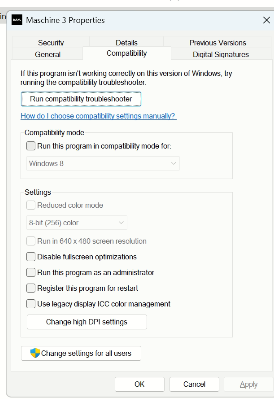
The Compatibility tab. The button you want is at the bottom of the Settings section. - 4Turn on the override and choose Application
Under “High DPI scaling override”, tick Override high DPI scaling behavior and set “Scaling performed by” to Application. Leave “Program DPI” at the top unticked. System and System (Enhanced) didn’t work for me.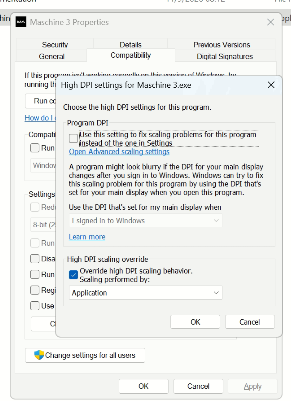
Override ticked, scaling performed by Application, Program DPI left unticked. - 5Click OK, then Apply, and restart Maschine 3
Open Serato Sample again. On my client’s machine the full plugin window appeared straight away.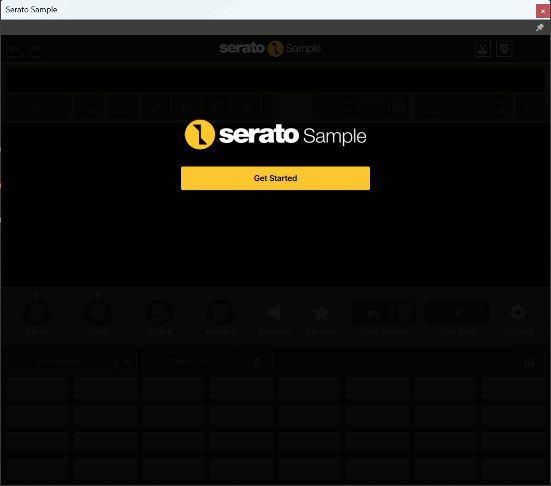
After the change: the full Serato Sample window, ready to use.
My client, I think, had come in half expecting to be told it couldn’t be done. He was delighted to see it working.
The catch: Maschine inside Ableton
Once it was working, we opened Maschine as a plugin inside Ableton Live and tried Serato Sample there. The plugin window wouldn’t open at all. With Maschine running inside a DAW, the override has to be off.
That fits Native Instruments’ own guidance. Their support article on using Maschine 3 in HiDPI mode in a DAW warns against overriding high DPI settings in the Windows application properties when Maschine runs inside Cubase or Pro Tools. For Ableton, they recommend turning off “Auto-Scale Plug-in Window” for Maschine 3 in Live’s plugin list.
So it comes down to how you work. If you mainly use Maschine standalone, the override is the fix. If you mainly use it inside a DAW, leave it off and follow NI’s settings for your DAW instead. If you do both, expect some plugins to work in one place and not the other until you change the setting. That’s why it can look as though plugins work one day and not the next. My client prefers standalone, so that’s how we set it up and left it.
One more thing from the same session: iLok blocked by Windows
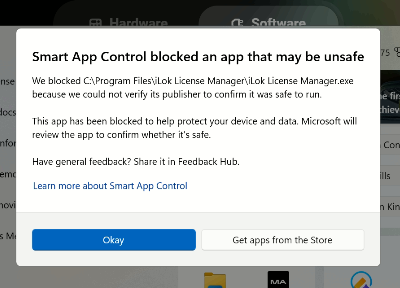
Separately, Windows 11 refused to run iLok License Manager. A box titled “Smart App Control blocked an app that may be unsafe” said it couldn’t verify the publisher. To get iLok working, I had to turn Smart App Control off (Windows Security > App & browser control > Smart App Control).
Know what you’re switching off before you do it. Smart App Control is a Windows security feature, and turning it off lowers your protection against untrusted apps. On older versions of Windows 11, turning it off was permanent unless you reset Windows. Since Microsoft’s April 2026 update, it can be switched back on, so make sure Windows is up to date first.
What I don’t know yet
I fixed this on one system: Windows 11, 150% scaling, Maschine 3 standalone, Serato Sample 2.2.0. I can’t promise the same setting fixes every plugin with display problems in Maschine 3, though forum posts report it helping with others.
I don’t know whether Native Instruments will fix the underlying problem in a later Maschine update. People have been reporting plugin windows that are cropped, zoomed in or blank in Maschine 3 on Windows since late 2024. I also only tested Ableton as the DAW, so I can’t tell you first-hand how the override behaves inside others.
If you’ve seen this with a different plugin or different scaling, I’d like to hear about it.
Common questions
Why does Serato Sample only show a yellow bar in Maschine?
On this machine it was a display scaling problem, not a fault in the plugin. With Windows scaling at 150%, the plugin window was drawn at the wrong size inside Maschine 3, so only part of it showed.
The VST2 works. Can’t I just use that?
You can, but check the version first. Here the VST2 was Serato Sample 1.3.0 and the VST3 was 2.2.0. That’s a different layout with different features.
Will reinstalling Serato Sample fix it?
It didn’t here, and neither did updating Maschine or removing the VST2 versions. They’re still sensible checks, because each one rules out a cause.
Will this break Maschine inside Ableton?
For my client it did: Serato Sample wouldn’t open in Maschine running inside Ableton until the override was turned off again. Set it up for the way you mainly work.
Can I undo it?
Yes. Untick “Override high DPI scaling behavior” in the same window and restart Maschine.
That’s my whole method, and you’re welcome to it. The high DPI setting may well be your fix. If you’d rather I looked at your system with you, book an hour and we’ll work through it together over a remote session.
Not sure it’s the same problem? Ask a question first