Case ID: #4734 Log Date: FEB 2025

Focusrite Scarlett Auto-Gain Causing Rising Noise Floor in a Voiceover Booth

Panic Index // FRUSTRATED
Technical Depth // HARDWARE
RESOLVED
Target Environment
macOS + Audacity / TwistedWave
Reported Symptom
“Excessive noise floor that increased dramatically during silent passages of a recording.”

Hi Paul. I’m a voiceover artist setting up a home recording studio. My mic is a Rode NT1-A and my audio interface is a Focusrite Scarlett 2i2 4th Gen. I need some help with:

  • Guidance on mic placement
  • How I can lower my noise floor?
  • Which software I should use?
  • How I should be processing my sound? 

I received the above request from a new client via my profile on the website Fiverr and we arranged a remote support session for the next week.

At the agreed time, my client and I connected via a WhatsApp video call and we set up AnyDesk for me to see her screen. My client and I started the session by discussing her questions and working out a priority. We agreed that the noise problems were the biggest issue to resolve, so we decided to tackle that first.

I took control of my client’s Mac and installed AudioMovers Listento plug-in. This would allow me to listen to the audio being recorded by my client in real time. We made a few test recordings and immediately I could hear there was a major problem with noise.

  • I checked that my client wasn’t recording in an overly noisy environment. She told me she lived in a rural area, so traffic and city noises weren’t an issue. She confirmed there were no appliances in the room like a heater or fridge that might be making constant background humming.
  • I asked my client to move her phone to show me the inside of her recording booth via the video call. I could see she had her microphone positioned correctly and I couldn’t see anything inside the booth that could be causing noise.
  • My client and I experimented with adjustments to the gain and AIR settings on her Focusrite Scarlett 2i2 audio interface. We disabled AIR, SAFE and the auto-gain feature. The noise remained.
  • I asked my client to show me the cabling between her microphone and audio interface. I checked that there were no power cable crossovers that could be affecting the audio signal. The type of noise I could hear in the recordings didn’t suggest this was the problem, but it was worth checking.
  • I checked all the audio settings on my client’s Mac to make sure there wasn’t an issue with a signal being path inside OSX’s Audio MIDI Setup.
  • We made our initial test recordings using the TwistedWave audio editor app. I wasn’t familiar with TwistedWave so I downloaded and installed Audacity to make sure there were no settings in TwistedWave that could be the problem.
  • After making a few more recordings in Audacity, I noticed something that gave me a clue to the cause of the issue:
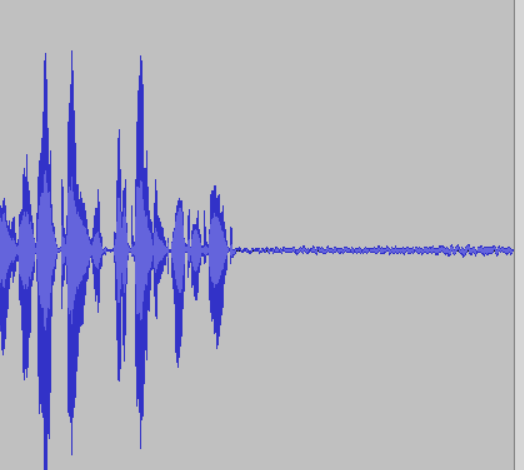
I could see that the noise level was rising after my client stopped speaking. This indicated that there was some sort of automatic volume levelling being applied to the signal.

I opened the Focusrite Control 2 app and checked the Auto Gain settings.
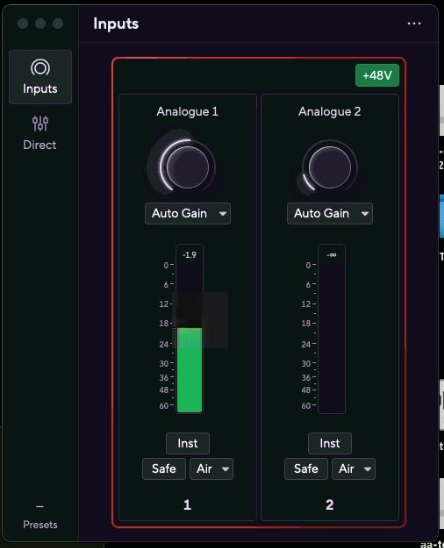
After experimenting with the settings I found that although I thought I had already turned auto-gain off, it couldn’t actually be turned off via the software application. My client found that she was able to disable it via the button on the front of the unit.

At this point we finished our first session and we arranged a time the next week to connect again. My client kindly took the time to leave me this nice review on Fiverr:
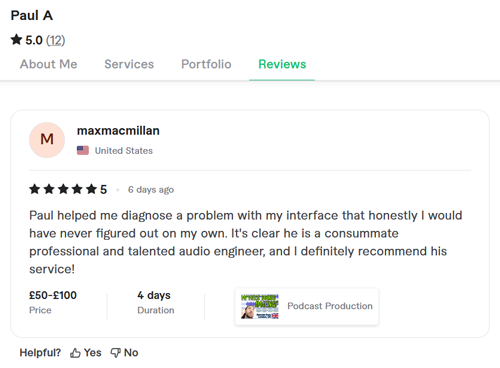
Paul helped me diagnose a problem with my interface that honestly, I would have never figured out on my own. It’s clear he is a consummate professional and talented audio engineer, and I definitely recommend his service!

Continued in Part Two

Categories: , , ,
Google
Laura Forrest-Hay profile picture
Laura Forrest-Hay
Google star 1Google star 2Google star 3Google star 4Google star 5Trustindex verifies that the original source of the review is Google.
Paul reinstalled all my lost sample libraries, streamlined the storage on my computer so it works faster and fixed my corrupted disk. it took us a couple of sessions and he was friendly and patient throughout. He never made me feel stupid and never over-explained stuff I already knew - in fact he boosted my confidence. Would highly recommend. I've put him on speed dial!
Google
MrMattkitt profile picture
MrMattkitt
Google star 1Google star 2Google star 3Google star 4Google star 5Trustindex verifies that the original source of the review is Google.
Paul was brilliant, listened to the issues I had on Cubase and my home studio, worked methodically through potential problems and sorted everything. Amazing service, down to earth and explained everything so I could understand. I am a very happy song writer once again thanks to Paul! Will be using Paul again in the future and highly recommend. Thanks Paul.
Google
Ciarán Hanna profile picture
Ciarán Hanna
Google star 1Google star 2Google star 3Google star 4Google star 5Trustindex verifies that the original source of the review is Google.
Honestly, if you're in any way stuck in a creative block because of the gear you have, you've more questions than answers about what the best setup should be for your flow, or even if you have very nuanced problems in your DAW/with your gear, the service Paul provides is second to none. Besides being an extremely nice guy, he knows his stuff and takes the time to understand what you want to get out of each session and makes sure all is good to go! Can't recommend him enough!
Google
Trudie Brogan profile picture
Trudie Brogan
Google star 1Google star 2Google star 3Google star 4Google star 5Trustindex verifies that the original source of the review is Google.
Really great service. Paul is so knowledgeable and I learned so much. Totally recommend.
Google
Cottin Ulysse profile picture
Cottin Ulysse
Google star 1Google star 2Google star 3Google star 4Google star 5Trustindex verifies that the original source of the review is Google.
Paul was fantastic, he solved my problem in less than 30mn, and he is a lovely guy. I really recommend him.
Google
Justin Bikram profile picture
Justin Bikram
Google star 1Google star 2Google star 3Google star 4Google star 5Trustindex verifies that the original source of the review is Google.
Paul provided as stellar service, worth every penny. I came to him with a genuine issue that was affecting my Logic Pro 11 album project regarding drums and midi maps and he solved my problem most efficiently. He was patient, courteous, quick thinking and highly knowledgeable. I will certainly consider using the service again and thoroughly recommend Audio Support - Thank you Paul - you are a star :)
Google
josh fulford profile picture
josh fulford
Google star 1Google star 2Google star 3Google star 4Google star 5Trustindex verifies that the original source of the review is Google.
Working in Reaper. Super knowledgeable, friendly, speaks in easy to understand terms. Paul is helping us DAW newbies get in the game. Paul got my lost plugin files working again as well as showed me how to find missing wave files for projects that were loading incorrectly. Keep this man on speed dial.
Google
Richard Grant profile picture
Richard Grant
Google star 1Google star 2Google star 3Google star 4Google star 5Trustindex verifies that the original source of the review is Google.
Paul fixed in around half an hour some midi keyboard/controller problems I have been trying to solve but have had to live with for around two years! He is very knowledgeable and patient and the Any Desk link worked perfectly. I wish I had found his website sooner and wouldn't hesitate to call on his services again. Rick Grant
Google
Paul B profile picture
Paul B
Google star 1Google star 2Google star 3Google star 4Google star 5Trustindex verifies that the original source of the review is Google.
Paul was excellent in helping me diagnose and resolve a problem I had on Logic Pro 12 file issues
Google
William Schrul profile picture
William Schrul
Google star 1Google star 2Google star 3Google star 4Google star 5Trustindex verifies that the original source of the review is Google.
Paul really helped get my Cubase up and running again. He really knows his stuff, and I'll definitely look him up again when I'm stuck. Thanks!!!

No automated tickets, no waiting queues — just one-to-one help from an experienced music technology specialist. I’ll connect to your system remotely, identify the issue, and guide you through the fix.