
Case #7716JAN 2026Paul Andrews

Pro Tools 2025.12 Crashing at Initializing MIDI Engine on Windows 11: The OneDrive Fix

Client stress // Stressed
Difficulty // Deep dive
Time to fix3 sessions
RESOLVED
Setup
Pro Tools 2025.12 · Windows 11 · Audient iD48
The problem
Pro Tools crashes on the splash screen every time it reaches Initializing MIDI Engine.
What I found
OneDrive had moved the Documents folder, even after it was uninstalled. Pro Tools couldn't reach its own settings files.
What fixed it
Reinstalled OneDrive, then turned off Documents syncing in its settings. Documents back in its normal place; Pro Tools loads.

Pro Tools crashed at “Initializing MIDI Engine”. The cause was OneDrive, even after it had been uninstalled.

This one took three sessions, and I didn’t find it until the third.

A composer got in touch because Pro Tools 2025.12 kept crashing on his Windows 11 PC. It got as far as initialising the audio engine on the splash screen, reached the MIDI stage, and disappeared. Every time.

He’d been away from the studio for a few weeks and had just updated some plugins and Pro Tools itself. He’d already tried what the forums suggest: going back to the previous version of Pro Tools, unplugging his MIDI devices one at a time, removing plugins, checking the playback engine at startup. Nothing helped. The one clue he had was that it started around the time he installed some Melda Production software.

Session one

We connected and tried everything I could think of:

  • Disabled all the MIDI devices in Device Manager.
  • Changed the audio driver.
  • Moved every plugin out of the plugins folder.
  • Held N while Pro Tools started and tried each playback engine option.
  • Searched forums and Avid’s compatibility information for anything known about 2025.12 and his hardware.

Nothing. He’d booked 45 minutes and we went on for an hour and a half before he had to go. I had to call that session unsolved. He hadn’t done anything wrong. He’d already tried the right things.

Session two

This time I went to the Windows Event Viewer, which said more than Pro Tools’ own logs. It pointed at a Windows file called ucrtbase.dll. Searching for that turned up other music software users, some on Cubase, with recent crashes linked to the same file. It’s tied to the Microsoft C++ Redistributables, which software installers can add or update. That made the Melda installer look guilty.

Windows Event Viewer, Application Error 1000: faulting application ProTools.exe version 25.12.0.127, faulting module ucrtbase.dll.
Windows Event Viewer showed what Pro Tools’ own logs didn’t: the crash was in ucrtbase.dll (boxed).

So we removed the redistributables, wiped the Pro Tools preferences, restarted, and reinstalled Pro Tools. None of it made a difference. At the end of that session the nuclear option was reinstalling Windows.

Session three

Between sessions I went back over my notes with Gemini, which I use as a thinking partner when I write cases up. I listed everything we’d tried and everything he’d tried before he called me. It asked whether removing OneDrive might have changed some of his file paths.

So in session three we looked at OneDrive.

OneDrive had been switched on on his PC without him really meaning it, and had started syncing large amounts of files. He’d tried to stop it by uninstalling the app.

But by then OneDrive had already redirected his Documents folder.

Some of his software was now looking for Documents at C:\Users\[name]\OneDrive\Documents instead of C:\Users\[name]\Documents, and the files there were stuck with a “pending” sync status.
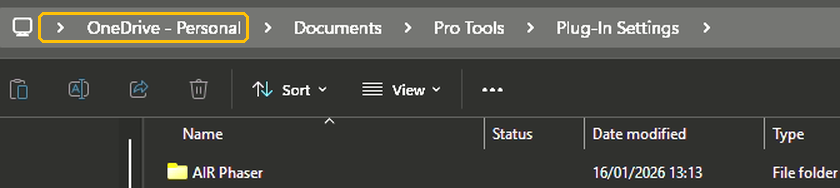
Windows File Explorer path: OneDrive - Personal > Documents > Pro Tools > Plug-In Settings.
The giveaway. Pro Tools’ settings folder was sitting under OneDrive – Personal (boxed), not in the normal Documents folder.

That matters because Pro Tools, like a lot of music software, keeps settings and preset files in Documents. When it reached the MIDI stage of starting up, it went looking for files in a folder it couldn’t properly get at.

The fix sounds backwards. We reinstalled OneDrive, then went into OneDrive’s own settings and turned off syncing for the Documents folder.
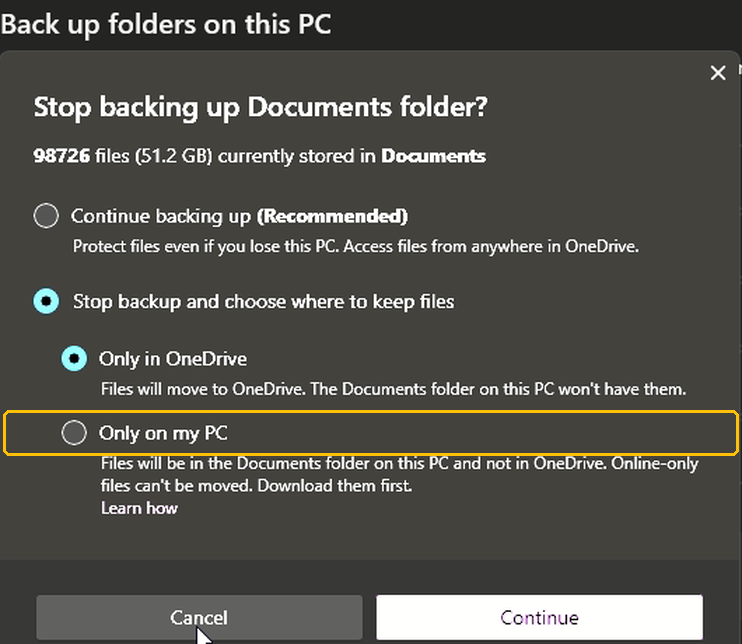
OneDrive dialog: Stop backing up Documents folder? Options to continue backing up, keep files only in OneDrive, or keep them only on this PC.
Stopping OneDrive backing up Documents, from OneDrive’s own settings. To keep your files on your computer, choose Only on my PC (boxed).

The pending status disappeared and Pro Tools loaded. We left OneDrive installed, with Documents syncing off, and I checked that Windows now showed his Documents folder in its normal place, not inside OneDrive.

Putting back the plugins we’d moved during testing took one more short session a few days later.

Looking back, the clue was on screen the whole time: that pending icon in his Documents folder. The Melda installer was a red herring.

Why this keeps happening

I’m seeing more of this, and it isn’t really the plugin makers’ fault. For years, Windows installers for music software have put settings, presets and sample libraries in the Documents folder by default. That was fine until OneDrive started taking that folder over.

Microsoft is pushing OneDrive harder now, and it often gets switched on without people realising. That causes two problems. The first is this one: OneDrive changes where Documents lives, someone tries to get rid of it the wrong way, and software can’t find its own files. The second is bigger. OneDrive starts uploading hundreds of gigabytes of sample libraries to the cloud, sometimes removing them from the computer, fills up the cloud storage and then offers to sell you more. Nobody needs their sample libraries in the cloud.

If Pro Tools on Windows 11 crashes at Initializing MIDI Engine, look at your Documents folder in File Explorer. If the path includes OneDrive, or files show a pending sync status, sort OneDrive out before you reinstall anything.

Book a session (£90)

Not sure it’s the same problem? Ask a question first

Google
Laura Forrest-Hay profile picture
Laura Forrest-Hay
Google star 1Google star 2Google star 3Google star 4Google star 5Trustindex verifies that the original source of the review is Google.
Paul reinstalled all my lost sample libraries, streamlined the storage on my computer so it works faster and fixed my corrupted disk. it took us a couple of sessions and he was friendly and patient throughout. He never made me feel stupid and never over-explained stuff I already knew - in fact he boosted my confidence. Would highly recommend. I've put him on speed dial!
Google
MrMattkitt profile picture
MrMattkitt
Google star 1Google star 2Google star 3Google star 4Google star 5Trustindex verifies that the original source of the review is Google.
Paul was brilliant, listened to the issues I had on Cubase and my home studio, worked methodically through potential problems and sorted everything. Amazing service, down to earth and explained everything so I could understand. I am a very happy song writer once again thanks to Paul! Will be using Paul again in the future and highly recommend. Thanks Paul.
Google
Ciarán Hanna profile picture
Ciarán Hanna
Google star 1Google star 2Google star 3Google star 4Google star 5Trustindex verifies that the original source of the review is Google.
Honestly, if you're in any way stuck in a creative block because of the gear you have, you've more questions than answers about what the best setup should be for your flow, or even if you have very nuanced problems in your DAW/with your gear, the service Paul provides is second to none. Besides being an extremely nice guy, he knows his stuff and takes the time to understand what you want to get out of each session and makes sure all is good to go! Can't recommend him enough!
Google
Trudie Brogan profile picture
Trudie Brogan
Google star 1Google star 2Google star 3Google star 4Google star 5Trustindex verifies that the original source of the review is Google.
Really great service. Paul is so knowledgeable and I learned so much. Totally recommend.
Google
Cottin Ulysse profile picture
Cottin Ulysse
Google star 1Google star 2Google star 3Google star 4Google star 5Trustindex verifies that the original source of the review is Google.
Paul was fantastic, he solved my problem in less than 30mn, and he is a lovely guy. I really recommend him.
Google
Justin Bikram profile picture
Justin Bikram
Google star 1Google star 2Google star 3Google star 4Google star 5Trustindex verifies that the original source of the review is Google.
Paul provided as stellar service, worth every penny. I came to him with a genuine issue that was affecting my Logic Pro 11 album project regarding drums and midi maps and he solved my problem most efficiently. He was patient, courteous, quick thinking and highly knowledgeable. I will certainly consider using the service again and thoroughly recommend Audio Support - Thank you Paul - you are a star :)
Google
josh fulford profile picture
josh fulford
Google star 1Google star 2Google star 3Google star 4Google star 5Trustindex verifies that the original source of the review is Google.
Working in Reaper. Super knowledgeable, friendly, speaks in easy to understand terms. Paul is helping us DAW newbies get in the game. Paul got my lost plugin files working again as well as showed me how to find missing wave files for projects that were loading incorrectly. Keep this man on speed dial.
Google
Richard Grant profile picture
Richard Grant
Google star 1Google star 2Google star 3Google star 4Google star 5Trustindex verifies that the original source of the review is Google.
Paul fixed in around half an hour some midi keyboard/controller problems I have been trying to solve but have had to live with for around two years! He is very knowledgeable and patient and the Any Desk link worked perfectly. I wish I had found his website sooner and wouldn't hesitate to call on his services again. Rick Grant
Google
Paul B profile picture
Paul B
Google star 1Google star 2Google star 3Google star 4Google star 5Trustindex verifies that the original source of the review is Google.
Paul was excellent in helping me diagnose and resolve a problem I had on Logic Pro 12 file issues
Google
William Schrul profile picture
William Schrul
Google star 1Google star 2Google star 3Google star 4Google star 5Trustindex verifies that the original source of the review is Google.
Paul really helped get my Cubase up and running again. He really knows his stuff, and I'll definitely look him up again when I'm stuck. Thanks!!!
